


In today’s digital age, having a user-friendly website is crucial for businesses. A user-friendly website not only improves the overall user experience but also increases the chances of visitors converting into customers. In this blog post, we will discuss the key elements that make a website user-friendly and the best practices for creating one. By following these best practices, businesses can improve their website’s user experience, increase website traffic, and ultimately grow their customer base.
Easy Navigation
Clear and intuitive navigation is one of the most important elements of a user-friendly website. Navigation is the backbone of a website, allowing users to easily find what they are looking for. There are several different navigation styles to choose from, including horizontal, vertical, and drop-down menus. It’s important to choose the right navigation style for your website based on the type of content and the number of pages you have.
One of the best practices for creating a user-friendly website is to keep navigation simple. This means using clear labels and grouping similar pages together. For example, if your website has a large number of pages, it’s important to organize them into categories and subcategories to make it easy for users to find what they are looking for.
Another best practice is to include a search bar on your website. A search bar allows users to quickly find the information they need without having to navigate through the entire website. This is particularly useful for websites with a large number of pages or for those with complex navigation.
Examples of good navigation design include Amazon’s navigation bar, which is organized into categories and subcategories, and Google’s search bar, which is prominently displayed on the homepage. Both of these examples make it easy for users to find what they are looking for and improve the overall user experience.

User-friendly Content
Simple and concise content is another important element of a user-friendly website. Content should be easy to read and understand, with a consistent layout and font throughout the website. It’s also important to use headings and subheadings to break up the content and make it easy for users to scan.
One best practice for creating user-friendly content is to use short paragraphs and bullet points. This makes the content easy to read and understand, and it’s less likely to overwhelm users. It’s also important to use images and videos to break up the content and make it more engaging.
Another best practice is to organize the content in a logical and easy-to-follow manner. This means using headings and subheadings to break up the content and make it easy for users to find what they are looking for. It’s also important to use a consistent layout throughout the website, so users know where to find important information.
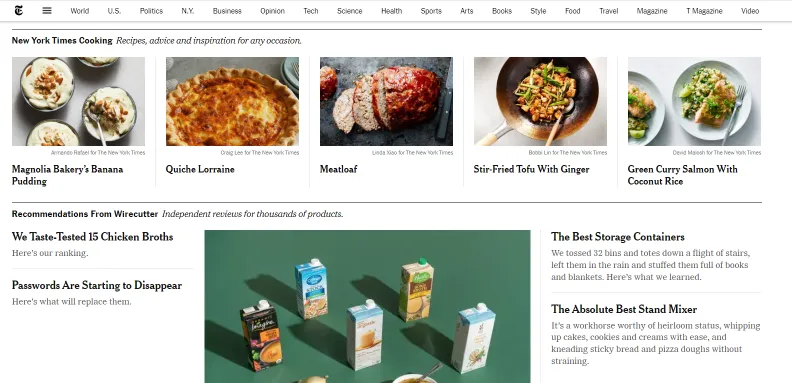
Examples of good content design include the New York Times’ website, which uses clear and concise headlines, short paragraphs, and images to break up the content. Another example is the website for the American Heart Association, which uses headings, subheadings, and bullet points to make the content easy to read and understand. Both of these examples make the content easy to read and understand and improve the overall user experience.
Accessibility
Accessibility is another important element of a user-friendly website. It’s important to make sure your website is accessible to all users, including those with disabilities. This means adding alt tags to images, providing transcriptions for videos, and using a larger font size for text.
One best practice for creating an accessible website is to use semantic HTML. Semantic HTML is the practice of using HTML tags in a way that describes the meaning of the content they contain. This makes it easier for screen readers to understand the content and improves accessibility for users with disabilities.
Another best practice is to test your website for accessibility. This can be done using online tools such as the Web Accessibility Evaluation Tool, which allows you to test your website for common accessibility issues. By testing your website and addressing any issues, you can ensure that all users, including those with disabilities, have a positive experience on your website.
Examples of websites that have good accessibility design include the website for the American Association of People with Disabilities, which uses semantic HTML and larger font size for text. Another example is the website for the National Federation of the Blind, which uses alt tags for images and provides transcriptions for videos. Both of these examples improve accessibility for users with disabilities and improve the overall user experience.

Mobile Optimization
Mobile optimization is another important element of a user-friendly website. With more and more people accessing the internet on mobile devices, it’s important to make sure your website is optimized for these devices. This means designing a responsive website that adapts to different screen sizes and making sure the website loads quickly on mobile devices.
One best practice for creating a mobile-optimized website is to use a responsive design. This means designing a website that automatically adjusts to different screen sizes, so it looks and works great on any device. This can be done using CSS media queries, which allow you to apply different styles to different screen sizes.
Another best practice is to optimize images and videos for mobile devices. This means compressing images and videos so they load quickly on mobile devices. It’s also important to make sure the website loads quickly on mobile devices, as users are less likely to wait for a slow-loading website.
Examples of websites that have good mobile optimization design include the website for the New York Times, which uses a responsive design and optimized images and videos. Another example is the website for Amazon, which also uses a responsive design and loads quickly on mobile devices. Both of these examples improve the overall user experience for users accessing the website on mobile devices.
Loading Speed
Website loading speed is another important element of a user-friendly website. With users becoming increasingly impatient, it’s important to make sure your website loads quickly. Slow-loading websites can lead to users leaving the website before it even finishes loading.
One best practice for creating a website with good loading speed is to optimize images and videos. This means compressing images and videos so they load quickly. It’s also important to reduce the number of HTTP requests the website makes, as these can slow down the loading time.
Another best practice is to use a Content Delivery Network (CDN). A CDN allows your website to be loaded from multiple servers, reducing the loading time for users. It’s also important to use a caching plugin, which stores a copy of the website on the user’s computer, reducing the loading time for repeat visitors.
Examples of websites that have good loading speed design include the website for Google, which loads quickly and uses a CDN. Another example is the website for Amazon, which also loads quickly and uses a caching plugin. Both of these examples improve the overall user experience for users by reducing the loading time.
Creating a user-friendly website is crucial for businesses in today’s digital age. By following the best practices discussed in this blog post, businesses can improve their website’s user experience, increase website traffic, and ultimately grow their customer base. These best practices include clear and intuitive navigation, clear and concise content, accessibility, mobile optimization, and loading speed. By implementing these best practices, businesses can ensure that all users have a positive experience on their website.
Digital Agency

